
· 2 min read
Replacing the production spreadsheet with a live KPI dashboard
Why hand-filled production sheets let you down, what a live KPI dashboard should show, and how to build one from the machines you already have.
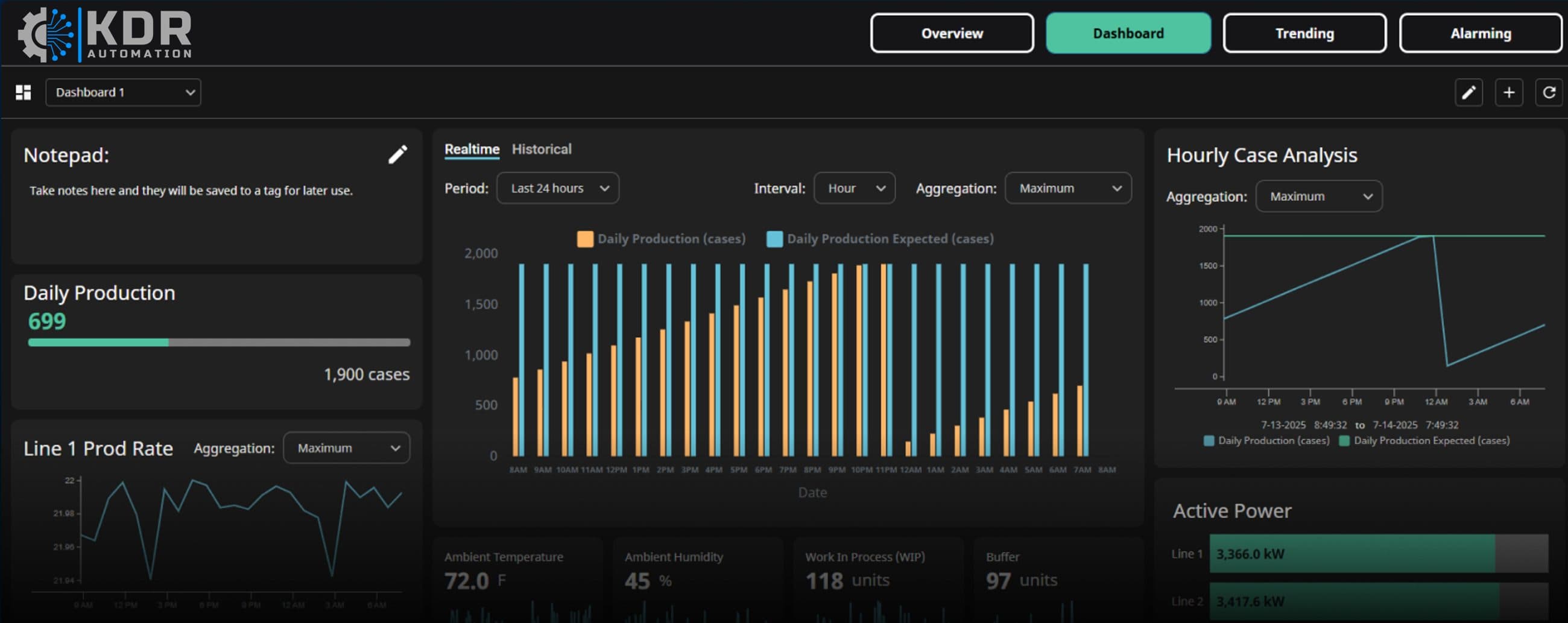
In a lot of factories, the production figures still live in a spreadsheet. Someone writes counts on a sheet at the end of each shift, someone else types them in the next morning, and by the time anyone looks at the numbers, the shift they describe is long gone.
Why the spreadsheet lets you down
- It is late. You find out about a bad shift the next day, when it is too late to do anything about it.
- It is inconsistent. Different people count, round and record differently.
- Nobody fully trusts it. So meetings argue about the numbers instead of the problems.
- It costs time. Somebody is paid to collect and type data that the machines already know.
What a live KPI dashboard should show
The screenshot at the top of this article is from our demo system, built on Ignition. A useful production dashboard typically includes:
- Actual against expected production, hour by hour, so a slow start is visible by mid-morning, not tomorrow
- Progress towards the day's target, as a simple bar anyone can read from across the floor
- Line rates, with a trend for the last 24 hours
- Supporting measurements such as power per line, ambient temperature and humidity, work in progress and buffer levels
- A shared notepad, so the night shift can explain a dip that the morning meeting would otherwise guess at
Every figure should be available as both live and historical data, with the time period and interval adjustable, so the same screen works for the shift leader now and the weekly review later.
What makes it work
Data straight from the machines. The counts and states come from the PLCs, not from people. Where an older machine cannot provide data directly, signals can often be picked up with remote IO.
Agreed targets. "Expected" has to mean something. Agree target rates per line and per product with the people who run them.
Screens people can reach. A dashboard is only useful if it is seen. Browser-based platforms like Ignition put the same screens on a large display on the floor, an office PC and a phone, without installing software on each.
It sits on top of what you have. You do not need to replace your existing SCADA or machine controls. A KPI layer can read from them alongside.
Start with three numbers
Resist the temptation to measure everything on day one. Pick three numbers that matter most this year, for example output against target, line rate and downtime, get those right and trusted, then add more.
We build dashboards like this for manufacturers across Ireland and the UK, often starting with a single line as a proof of concept. Read more about our SCADA and data work, or get in touch to talk about your site.
Related: SCADA and data